Importing data into Webmail
STRATO Webmail offers you various options for importing contact details, calendars and tasks from different sources.
You can find the import function in STRATO Webmail under the relevant menu item. In this guide, we explain how to use it using the Address Book as an example.
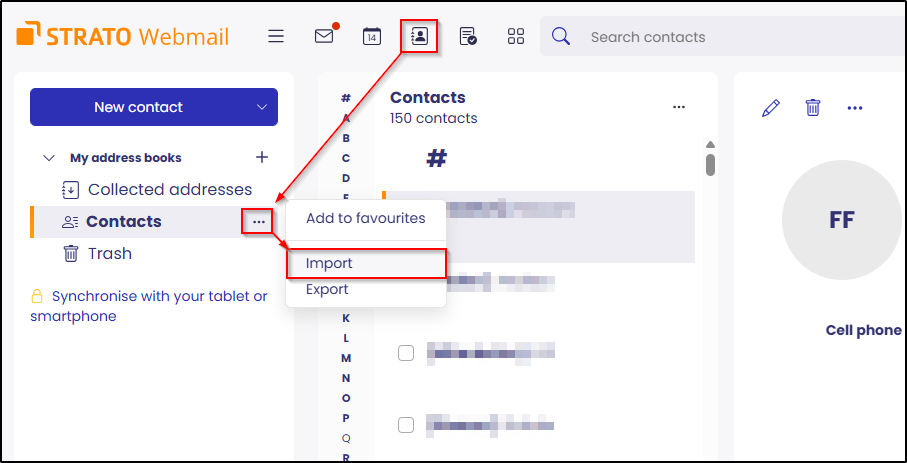
To open the import dialogue, navigate to Contacts, open the three-dot menu and select Import.
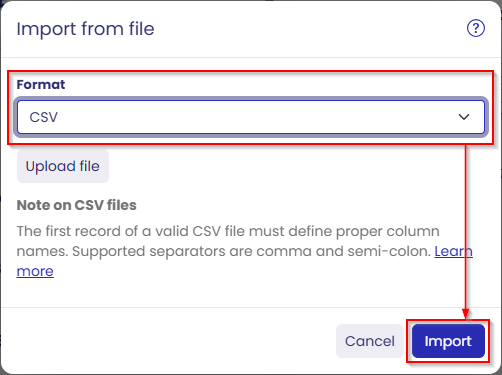
First, select the desired format type, vCard or CSV files, from which you want to import.
Click on the Upload file button to select the locally stored file. Then start the import process by clicking on the Import button.
The process works in the same way with the other menu items Calendar and Tasks.